
Revision 0 - 2026-09-06
Layout and Features
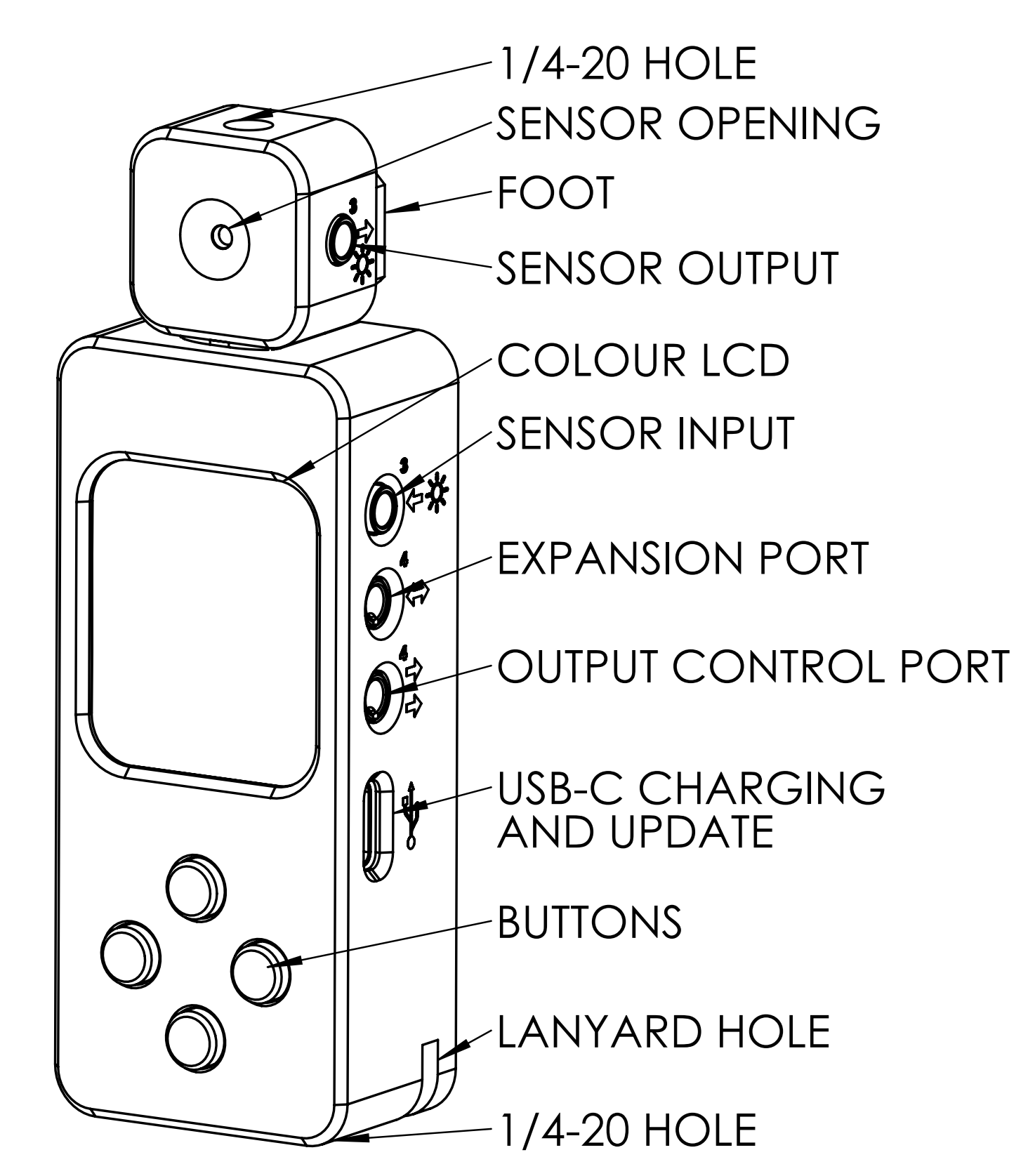
Key Features
Incident and reflective UV metering
Detachable sensor for on-camera or in-process metering
Single or Integrated reading modes
Simple controls and menu
Exposure unit output controls
Future accessory expansion port
900mAh NiMH rechargeable battery
Exposure finished warning beeper
Safelight display mode
Dimensions: 105mm (4.13”) long, 35mm (1.37”) wide, 23mm (0.9”) thick, including sensor
Technical Data
Measuring range
0 – 250,000 uW/cm2
Exposure Compensation:
+/-3 stops in 1/3 stop increments, extended range in 1 stop increments up to +20
Output Control Port: 5V supply (when USB C connected) + 2x current sinking MOSFET for controlling relay module (sold separately)
Battery: 900mAh NiMH internal rechargeable (user-replaceable)
Dimensions: 105mm (4.13”) long, 35mm (1.37”) wide, 23mm (0.9”) thick, including sensor
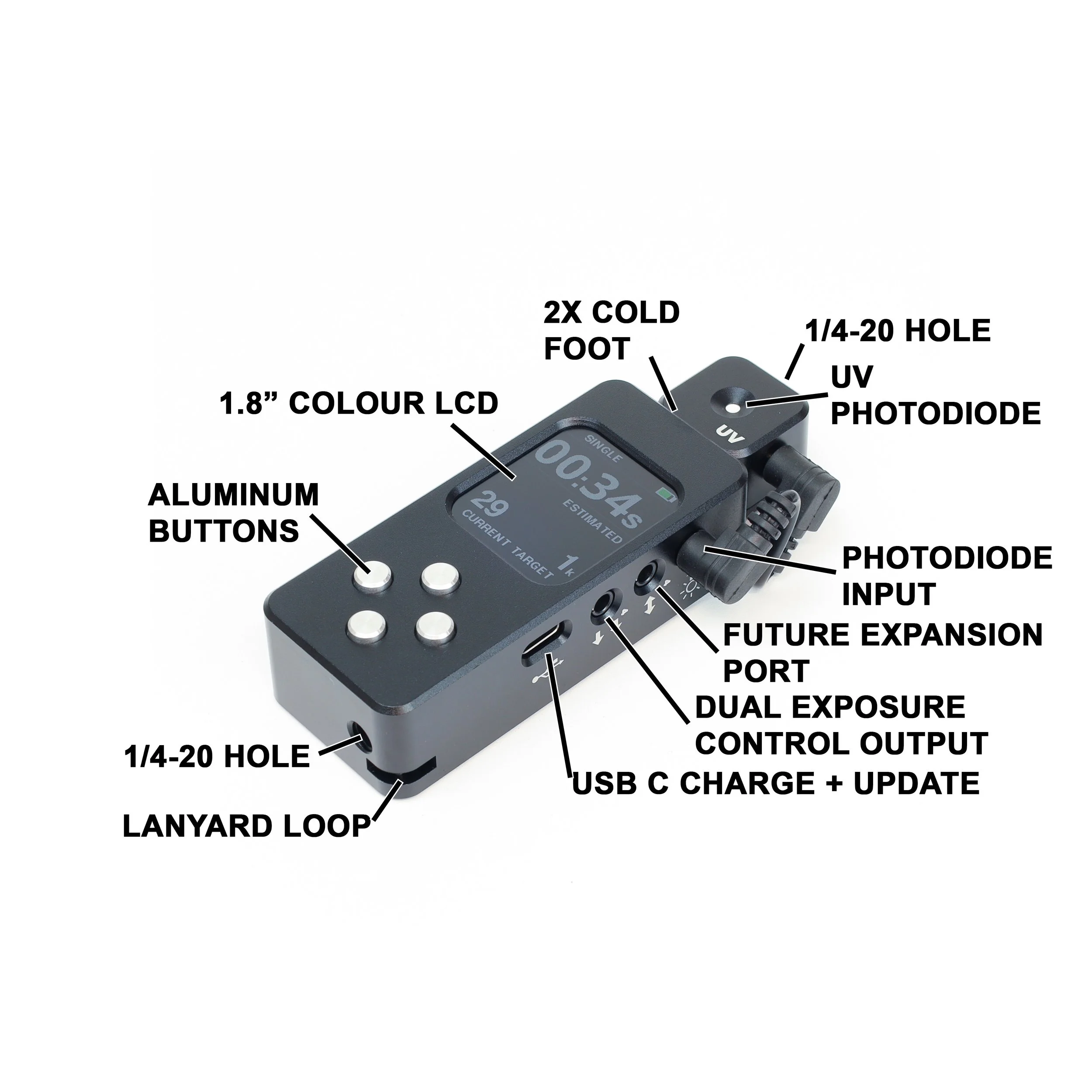
Getting Familiar With Your Meter
Battery and Charging
The Reveni Labs ALTO uses a 900mAh 2.4V Nickel Metal Hydride (NiMH) rechargeable battery, giving around 6 hours of active use. It can be replaced by the user and uses a 2mm 2-pin JST connector.
Charging is done via the USB-C port on the right side. Charging from a fully depleted battery takes around 5 hours. When charging, the screen will show an animated charge indicator. The meter can be used while charging.
Dispose of batteries in accordance with your local laws. If throwing away your ALTO, do so in accordance with local electronics disposal/recycling laws.


Physical Care
The Reveni Labs ALTO is designed to be rugged and sturdy, and should not break from regular use. It is not intended to be exposed to excessive moisture such as direct raindrops. There is the possibility of permanent damage if it is exposed to water. If the meter does get wet, open the back and disconnect the battery, then wait for it to dry or place inside a sealed container with uncooked rice to absorb the moisture.
Dirt can be wiped off with a slightly dampened cloth or dry brush. Dust can be blown away with a dry blowing device such as a compressed gas duster or puffer bulb.
Do not dismantle your ALTO for any other reason.
Using Your Meter
Please ensure that you are familiar with the operation of your meter and that it is providing consistent, accurate readings prior to taking your photographs. Incorrect operation can impact the accuracy of your reading.
Controls
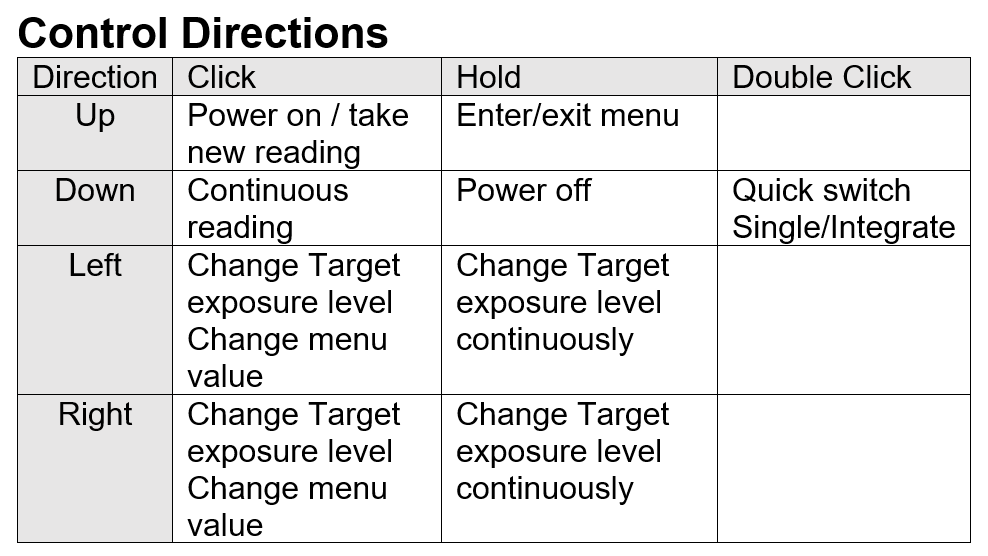
The ALTO has four aluminum buttons on the surface which control all the functions. Each has two functions, one from a short press and one from a long press. The buttons are referred to as Up, Down, Left and Right in this user manual. The specifics are detailed in the table below, and reminders are engraved on the backside of the ALTO enclosure.
Power
Press the Up button to turn on the ALTO. The ALTO will automatically turn off after the prescribed time, which is configurable in the menu. If you wish to turn it off quicker to conserve battery, you can press and hold the down button to power it off.
Sample Screen
The data on the screen
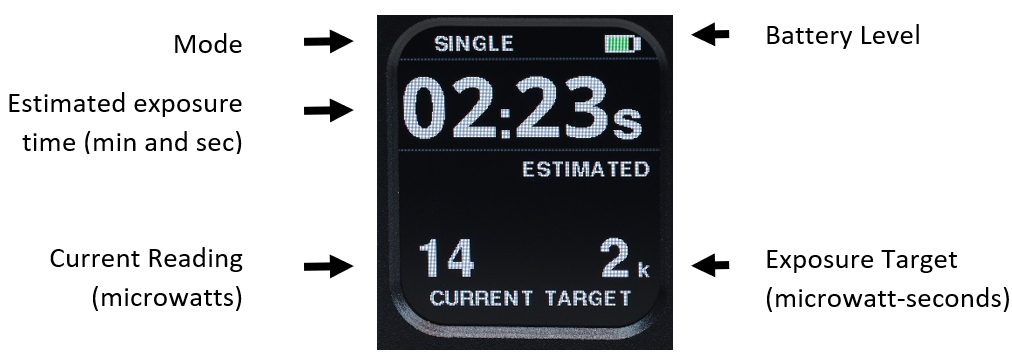
In all modes, the ALTO displays three things:
Estimated exposure time
Current UV level
Target UV level
The “current” reading is the instantaneous UV intensity on the sensor. The unit is microwatts per square centimeter.
The “target” is the user-selected total amount of UV exposure that is desired. The measurement unit is microwatt-seconds per square centimeter (uW/cm^2), but the technical detail of microwatts not important in actual use.
The current and target amounts can be thought of as “units per second” and “units” of UV light.
The exposure time is the calculated amount of time required for the target UV level to be reached, given the current UV intensity that was measured.
Finding the right number of “units” (exposure) for your materials
Through experimentation, you’ll need to determine the target exposure for your materials and equate it to a certain number of units. This is akin to experimentally determining the “ISO” sensitivity of an unknown silver gelatin film stock. By doing test exposures, or using a step wedge, along with ALTO readings, you can determine how many units of UV light are required for your material. You only need to do this once for your particular material; if your materials remain consistent batch to batch, the exposure level required won’t change and you’ll get perfect exposures every time.
For example, if you have a UV exposure box that outputs a steady 1000 units per second of UV (as measured by your ALTO) and you know from past experiments and experience that you get a good print with a 60 second exposure time, then you can deduce that your material needs 60,000 units of UV to get a good exposure, regardless if this 60,000 units is delivered in one minute or ten minutes. Once you know the number of units needed for your materials, you can use any UV source to get good exposures.
This is no different than shooting with a fast lens at a fast shutter speed, and shooting with a lens fully stopped down and using a slow shutter speed. The total amount of light reaching the film remains the same, it’s just a variance of the intensity and time ratio.
Metering Mode
The Reveni Labs ALTO offers different metering modes for different situations and applications.
Single Mode
Single reading mode is used to take an instantaneous UV light reading. Based on the exposure target, the estimated exposure time is calculated and shown. The exposure time is valid if the UV light source is not changing, such as an LED exposure box. If the source is variable, like natural outdoor UV, then Integrate mode must be used.
Integrate Mode
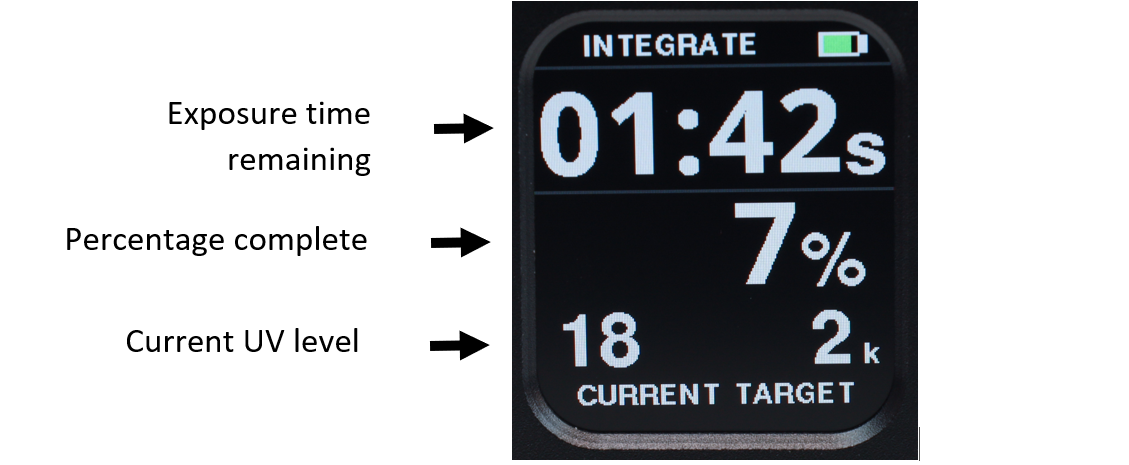
Integrate mode is used to compensate for changing lighting conditions during a long exposure.
To use integrate mode, place the ALTO sensor so it is in the same lighting conditions as your materials. For in-camera exposure, place the sensor on the front of the camera, aiming towards the subject. The ALTO’s sensor can be detached and connected via the included extension cable. For printmaking, place the sensor aiming towards the light source, next to the print materials. In both cases, the sensor should be exposed to the same light as the materials.
Prepare the ALTO by setting the target value according to your material experiments.
Press the up button to start the integration process, while at the same time opening the shutter or uncovering the material. The ALTO will take a 10 readings per second and keep a running total of the exposure, recalculating and displaying the remaining exposure time on the display. When the exposure time remaining drops below 15 seconds, a warning beep will begin to sound so you can prepare to stop the exposure.
Control
Control mode is the same as integrate mode, except the outputs are activated. This allows for control of a UV exposure box and/or vacuum table. The ALTO relay module is available as an optional accessory.
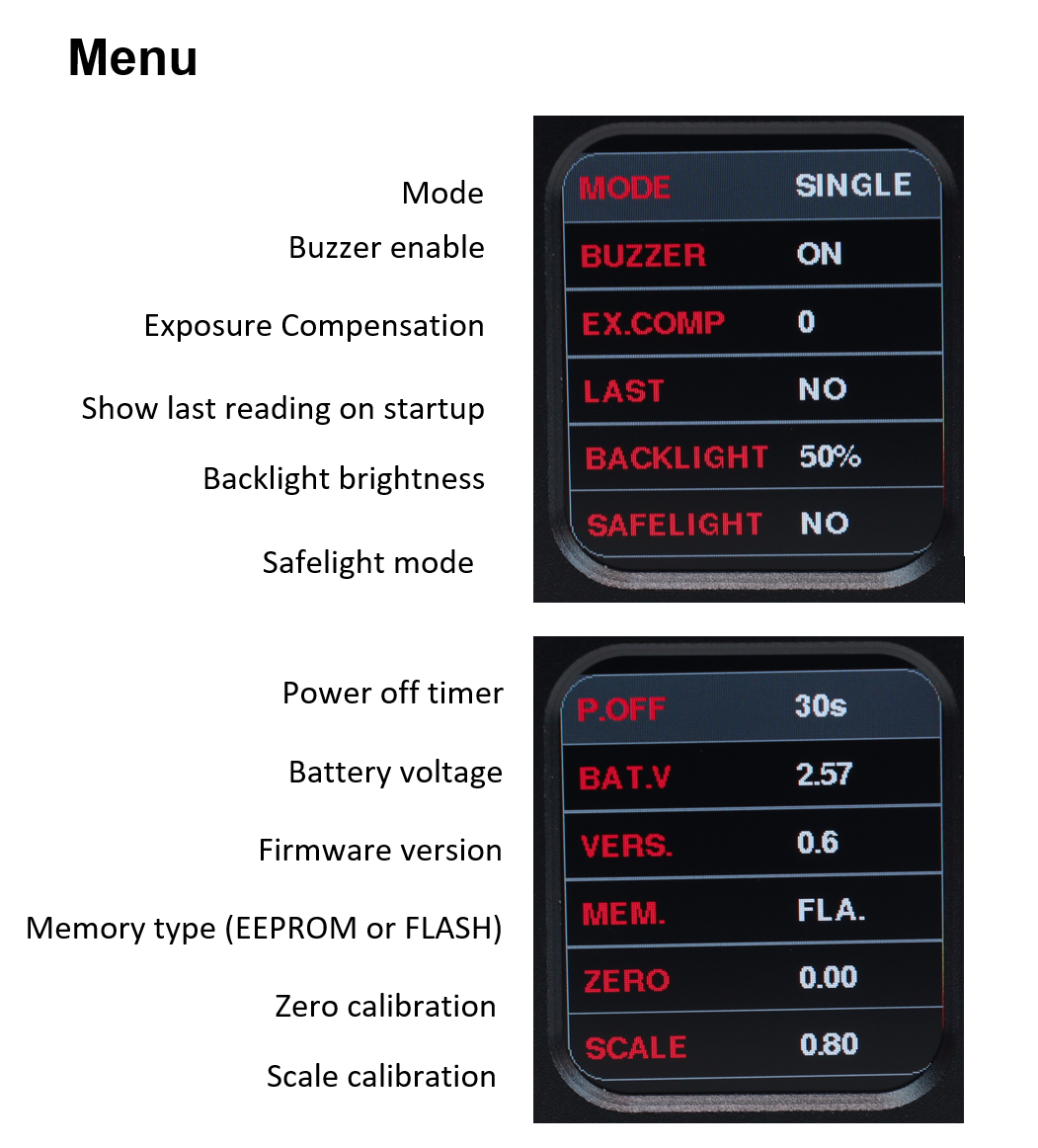
Buzzer Enable
Turn the audible buzzer on and off. Helpful when doing exposures in noisy environments, and to warn you that the exposure is nearing completion when doing long exposures.
Exposure Compensation
The Reveni Labs ALTO has an exposure compensation feature commonly found on digital cameras and cameras with automatic metering. It allows the user to set an “offset” for the exposure.
Last
Setting last to “YES” will make ALTO remember the last reading and show it on startup.
Backlight Brightness
Change the backlight brightness in 10% increments.
Safelight Mode
Turns the display red to prevent/reduce harm to visible-spectrum sensitive materials. The backlight brightness should be adjusted to a low level when using this mode.
Power Off Timer
Select how long ALTO stays on for when inactive.
Battery Voltage
Shows the raw battery voltage. ALTO powers off automatically around 2.1V, and delivers warnings on startup before then.
Firmware Version
Shows the current firmware version.
Memory Type
Selects whether the ALTO settings are stored in an EEPROM or in FLASH memory. The user can change this option if there is any issue with setting retention on power down.
Zero Calibration
This value is adjusted so that in the presence of no light (or the sensor is inplugged) the reading is zero.
Scale Calibration
This value is adjusted at the factory to match a reference UV meter. The user can adjust this value to match another UV meter if they wish.
USB Software Update
Find the latest firmware here
Service and Repairs
Please contact Reveni Labs directly if your meter requires repair. Reveni Labs is the only company that has the knowledge required to repair a Reveni Labs ALTO. Please use the Contact Us link below to get in touch.
https://www.reveni-labs.com/contact
FCC (United States only)
This device complies with Part 15 of the FCC Rules.
Operation is subject to the following two conditions:
(1) this device may not cause harmful interference, and
(2) this device must accept any interference received, including interference that may cause undesired operation
ICES(Canada only)
ICES-003
This Class B digital apparatus complies with Canadian ICES-003.
Operation is subject to the following two conditions: (1) this device may not cause harmful interference and (2) this device must accept any interference received, including interference that may cause undesired operation.
NMB-003
Cet appareil numérique de la classe B est conforme à la norme NMB-003 du Canada. L’utilisation de ce dispositif est autorisée seulement aux conditions suivantes: (1) il ne doit pas produire de brouillage et (2) l’utilisateur du dispositif doit être prêt à accepter tout brouillage radioélectrique reçu, même si ce brouillage est susceptible de compromettre le fonctionnement du dispositif.
This product is designed to meet RoHS compliance regulations
Protect the environment by not
disposing of this product with
household waste (2002/96/EC).
Check your local authority for
recycling advice and facilities
(Europe only).
Safety Warnings
In the event of a malfunction, remove the battery immediately.
If smoke or a bad odor comes from the meter, remove the battery and do not use the meter again without contacting Reveni Labs.
Never use the Reveni Labs ALTO in an environment containing flammable gasses as there is a danger of explosion or fire.
Do not allow children to play with the Reveni Labs ALTO as it and its parts are small enough to present a choking hazard.
Do not allow children to wear the Reveni Labs ALTO around their head or neck with a neck strap, as this presents a strangulation danger.
Keep out of reach of children or pets.
Do not open the Reveni Labs ALTO unless necessary to replace the battery; it contains no other user-serviceable parts.

